I really enjoyed creating an N-body simulation in Rust and web assembly and this is an attempt to put into words some of the challenges I faced and the things I learned. In case you don’t know, n-body simulations are simulations of dynamical systems of many particles that interact with each other. They are used widely in astrophysics to investigate the evolution of systems like clusters of galaxies. I used Rust and computer graphics to visualize in the browser an n-body simulation of a system of many bodies that are attracted by each other because of gravity.
The simulation is here.
Gravity
The gravitational force is described well by the classical Netwonian mechanics, by which a body with mass \(m_1\) attracts another with mass \(m_2\):
$$\vec{F}_{12} = -G \frac{m_1 m_2}{r^2} \hat{r}_{12}$$where \(G\) is the gravitational constant and \(r\) is the distance between them. Scaling this to three or more bodies we get a system of differential equations which can be solved only numerically. For the numerical integration my goal was to use the Burnes-Hut algorithm. As Newton’s formula indicates, the gravitational force must be calculated for every body by summing the attraction from each other body of the system. As such, methods that work this way have quadratic time complexity \(O(n^2)\). The Burnes-Hut algorithm however reduces the time complexity to \(O(nlog)\) by reducing drastically the number of interactions that must be computed. This is achieved by splitting the (2D) space into a quadtree and grouping together into the same branch of the tree the interaction of bodies which are very far, and thus, their gravitational force is a lot less.
Solving the three body problem first
I started by making sure that I have something correct working by solving the three-body problem for specific initial conditions (position and velocity). For most initial conditions the dynamical system for three orbiting bodies is chaotic, which means that their orbits cannot be predicted. However for some very specific initial conditions the orbits are periodic. I found the initial conditions of some periodic orbits here.
I used the Leapfrog integration method to integrate the equations before moving to more complicated methods. On each step the gravitational force is calculated for each body and its position and velocity are updated. For visualization I used the canvas api which is very easy to use via the web-sys rust crate. Drawing a circular body for example is as simple as this:
pub fn draw_body(p: &Position, ctx: &web_sys::CanvasRenderingContext2d, c: &str) {
    ctx.set_fill_style_str(c);
    ctx.begin_path();
    ctx.arc(p.x, p.y, 5.0, 0.0, 2.0 * std::f64::consts::PI)
        .unwrap();
    ctx.fill();
}
A particular challenge throughout this project was mapping the physical coordinates of the bodies to the coordinates of the rendering system, in this case to the canvas api. In general I though of two approaches on how to do this: Either I map the bodies coordinates to the rendering api at render time, so do all calculations on the scale of the given initial conditions on the physical space and map right at the end. This is what I did later when using webgl, as I describe below. The other approach, which i used with the canvas api, was to map the initial conditions of the bodies at the beginning to the coordinates of the canvas and then do all numerical calculations on that coordinate system.
I had set up my canvas to a square of 1000x1000 pixels, so the initial conditions which were given in (-1, 1) had to be mapped to an html canvas of 1000 pixels high and wide. Also, the canvas origin is at the top left and that the vertical axis increases towards the bottom of the screen. So first I translated the bodies from near the origin of the cartesian coordinate system to the middle of the html canvas, say around (500, 500). Then the distance between them had to be increased, so that they are visually distinguishable, since their initial distance was about 2 but my canvas expanded 1000 pixels on each direction. Last, the vertical axis had to be reversed and subtracted from the bottom max. Here is the code with which I did that:
// zoom in and translate bodies position to the center of the system
for b in &mut bodies {
    // map [-1, 1] -> [-100, 100] and reverse y direction
    // for example when max_heigth = 1000 the factor must be 100
    let factor = canvas_size / 10.0;
    let factor = 100.0;
    // translate to center, for example to (500, 500)
    // find the center of the canvas (height == width)
    let offset = canvas_size / 2.0;
    let horizontal_offset = width / 2.0;
    let verical_offset = height / 2.0;
    b.p.x = b.p.x * factor + horizontal_offset;
    // example: when max_height = 1000, y: -1 should translate to 600 in the canvas
    b.p.y = height - (b.p.y * factor + verical_offset);
}
As a result however, since the distance between the bodies got increased by a factor of 100, it meant that the gravity between them decreased – by a lot more:
// Depends on the zoom in factor. Each order of magnitude of the factor adds 3 orders of magnitude
// to gravity, since the magnitude is the distance to the power of 3.
pub(crate) const G: f64 = 1000000.0;
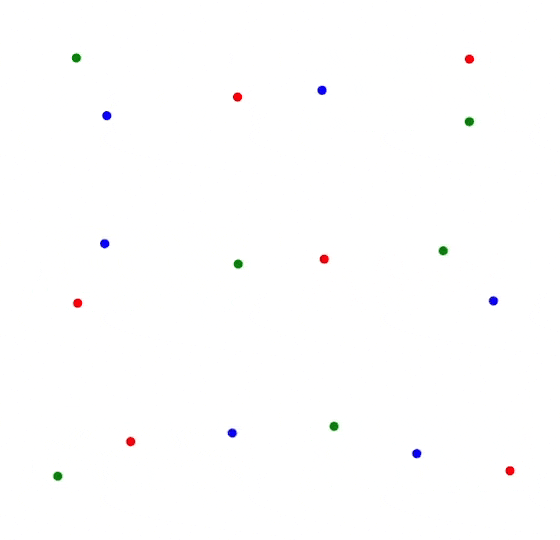
With these I managed to simulate the figure-8 dynamical system:
Burnes-Hut
Following the Burnes Hut algorithm I created recursively a quad tree that expanded through the canvas on each integration step. A node (quad region) that contains a single body or no body at all is an external node and a node that contains two or more bodies is an internal.

The bodies in the image are randomly colored and the smaller black dots are the center of the mass of each internal node. For each body I calculated its acceleration (=force) due to the gravitational attraction from all other bodies by traversing the tree starting from the root node and recursing towards the leaves. The improvement in efficiency comes from figuring out which nodes are too far from each body by calculating the ratio of the edge of the distant node over its distance from the body. Nodes that are sufficiently far based on a threshold value \(\theta\) are considered a single body whose position is the center of the mass and its mass is the sum of the masses that are contained in the area of that particular node:
    fn traverse(node: &Node, body: &mut Body) -> (f64, f64) {
        match node {
            Node::External { body: nodebody, .. } => {
                if let Some(nodebody) = nodebody {
                    if nodebody.id == body.id {
                        // same body
                        (0.0, 0.0)
                    } else {
                        body.force(nodebody)
                    }
                } else {
                    // no bodies in the node
                    (0.0, 0.0)
                }
            }
            Node::Internal {
                children,
                totalm,
                edge,
                com,
                ..
            } => {
                // small values mean the node is too far from the body
                let toofar = edge / (*com - body.p).norm();
                // When evaluating an internal node in which body is in
                // THETA less than 0.7 guarantees that the body will not use its internal node.
                // Within a circle with center the body and radius equal to the edge toofar is > 1.
                // Outside is < 1. On the extreme case where the com is on one corner and the body
                // is on the opposite:
                // ----------
                // |       x|
                // |        | e
                // |o       |
                // ----------
                //     e
                // Along the hypotenuse the distance is sqrt(2) e.
                // That makes toofar = e / sqrt(2) e = 1 / sqrt(2) = 0.707
                // Alternatively, we can always recurse into the children when the body is
                // contained in the internal node.
                if toofar < THETA {
                    body.force_from_node(com, *totalm)
                } else {
                    let (ax1, ay1) = BurnesHut::traverse(&children[0], body);
                    let (ax2, ay2) = BurnesHut::traverse(&children[1], body);
                    let (ax3, ay3) = BurnesHut::traverse(&children[2], body);
                    let (ax4, ay4) = BurnesHut::traverse(&children[3], body);
                    (ax1 + ax2 + ax3 + ax4, ay1 + ay2 + ay3 + ay4)
                }
            }
        }
    }
Webgl
The Burnes-Hut algorithm worked alright, so immediately I tried to see what happens when I add a lot more bodies. So I tried to simulate for example 5000 bodies placed randomly in the canvas and the bottleneck became immediately obvious: The browser was executing all calculations using a single CPU core. When a single core was overloaded at 100% frames per second dropped. Instead of trying to split the workload to many threads (not sure how easy that is when compiling web assembly) I tried to make the single CPU core do less.
Webgl allows writing shaders (GLSL) which is code that is executed on the GPU. Using it was a little hairy at first, because I had to understand how to create the necessary buffers on the GPU memory together with vertex arrays that indicate how to use those buffers. However, the webgl api is easily accessible via the web-sys create and the minimal example here is useful. On webgl webgl fundamentals helped a lot and is by far the best resource I found. For my N-body simulation I guess there are other more advances webgl techniques, but I just updated the data on the bound buffer which represent the body positions on every step of the calculation. I drew the bodies using webgl points, which made them appear as squares. Later I used gl_PointCoord, which shows the coordinates within a point, to make them appear as circles by trimming the corners of the squares.
The most interesting challenge when rendering with webgl was the correct handling of the “clip space”. The clip space is a cartesian coordinate system [-1, 1] which the gpu uses to render all the data. The initial conditions are also given in [-1, 1] but the physical positions of the bodies may expand beyond the clip space as they move, obviously. So, contrary to the mapping I did for the canvas api, I decided to “zoom in” by dividing all body positions by 10 right before they get sent to gpu for rendering. As a result any body whose position is within [-10, 10] gets rendered. The width and the height of the html canvas do not affect the position of the bodies; the webgl canvas dimensions are always mapped to the clip space by the GPU.
Now the orbits were centered in the canvas, there was plenty of space around, and the periodic figure 8 seemed to be correct…for the first few seconds. Then this happened:

So fascinating. Although the bodies started from their correct positions, and their orbits seemed to be forming figure-8 correctly, at some point gravity disappeared. The bodies stopped being attracted by other bodies and got left wandering in empty space alone without any other change to their momentum ever again.
I found the root of the problem by measuring how many bodies were contained in all nodes on every step. The root node of the quadtree expanded from -1 to 1, so when a body drifted far from the tree its gravitational interactions were no longer calculated, since the body was not contained in any tree node. Increasing the edge of the of the root node of the quadtree fixed the problem. It was important to realize that the width of the quadtree is not limited by the clip space or the html canvas dimensions. It can be as big as desired, since it corresponds to the physical coordinates of the bodies and not to the rendering system.
Later on when I was fixing something else I observed the same behaviour which is related to the area of the quad tree. If a body is found right at the edge it will be attracted towards the opposite way, since there are is no attraction outside the tree and the only gravity comes from inside. Now, since it has gained velocity towards the inside of the quad tree area, it will continue moving until it reaches the other edge of the quad tree, if no other gravitational forces distracts it, where its velocity will change direction again for the same reason. A cluster of bodies placed initially at the edge of the physical space will appear as if oscillating trapped within the area of the tree, until those at the edge with great momentum do not manage to change their direction before they step over and fall off the tree where there is no gravity.
N bodies and regularization
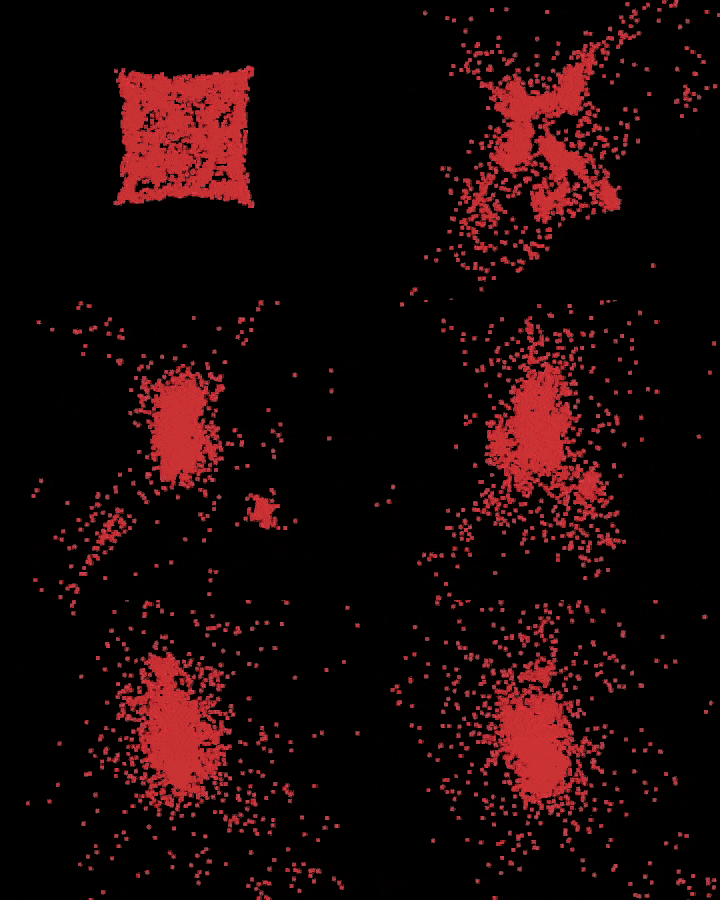
As Newton’s formula indicates when two bodies come very close the gravitational force between them tends to become infinitely large. This is obvious in the simulation, for example here are 50 bodies placed randomly at the center:

Some bodies come very close, their attraction to each other becomes so big that they shoot off with great momentum. There is no collision mechanism implemented. While regularization methods exist which deal with this problem in robust mathematical ways, I chose to do something very simple instead: When two bodies come too close ignore any gravity. They continue their orbits without being affected by those that are very close to them. That made a huge difference. As expected, the bodies now seemed to be indeed attracted and moved towards areas where the mass concentration is bigger:
Then, improving that a little bit I added a softening parameter in the gravitational force calculation instead of completely ignoring by artificially increasing the distance between interacting bodies so that their mutual influence is reduced if they come very close.
Performance
The huge benefit from using the Burnes-Hut algorithm can be seen easily when setting the threshold value \(\theta\) to 0. In this case no internal node is treated as a single body, no matter the distance. For each body its interaction with all other bodies is calculated and frames per second drop clearly:

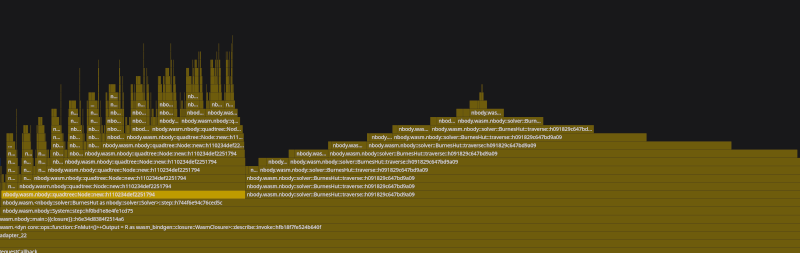
Apart from that some small optimizations seemed to make a big difference. Looking at the web profiler is obvious where most of the time is spent. Each step is split into:
- calculating the force from bodies that are close enough
- calculating the force from an internal node when the node is too far
- another recursive call to traverse the tree.

The force calculation in particular involves calls to powi. Replacing them with simple multiplications was a low hanging fruit. Looking at the flamegraph, before the removal of the powi calls only 17% was being spent on constructing the new quadtree on each step:

After the removal of the powi calls more time was being spent on the construction of the quad tree, 25%. So the traversing of the tree, where the norm and the magnitude are calculated, got 8% faster. Not knowing for sure I though that the compiler would optimize that away in the first place. Although probably it was not optimized because I was compiling in debug mode.
Next I tried to optimize the tree construction. The way I had made it until now when the tree is constructed recursively the bodies are cloned into the new quadrants:
fn new(center: Position, edge: f64, bodies: Option<Box<[Body]>>) -> Node;
and when creating a new quadrant I found which bodies are contained in its region. contains() creates new copies:
let bodies1 = Node::contains(&bodies, &c, halfedge);
let n1 = Node::new(c, halfedge, bodies1);
To improve this I tried to use references with a Vec<&Body>. The idea was to allocate pointers to the original slice on every new Node instead of coping the data. So new() became this:
fn new(center: Position, edge: f64, bodies: Vec<&'a Body>) -> Node<'a>
and contains() was changed to return a new Vec holding references to the bodies that are contained in the node. Then, in order to measure exactly any possible improvement I added a quick way to measure the frames per second in the main animation loop and print them in the console roughly every 5 seconds:
    let performance = window()
        .performance()
        .expect("performance should be available");

    let mut frames = 0;

    let f = Rc::new(RefCell::new(None));
    let g = f.clone();
    let main_loop_closure = Closure::new(move || {
        s2.step();
        s2.draw();

        let seconds = performance.now() as u64 / 1000;
        frames += 1;

        if seconds > 0 && seconds.is_multiple_of(5) {
            let fps = frames / seconds;
            log!("fps: {}", fps);
        }

        let _ = request_animation_frame(g.borrow().as_ref().unwrap());
    });
Interestingly there was no improvement when using references instead of copies. Measuring always with 4000 bodies that are randomly distributed in the same center region, fps were about 40 with both approaches (on my cpu having compiled in debug mode). However, considering that the Body struct is only a few f64 (Position and Velocity include only two f64 each):
#[derive(Copy, Clone)]
pub struct Body {
    pub p: Position,
    pub v: Velocity,
    pub m: f64,
    pub id: usize,
}
it makes sense, since those f64 can be copied very quickly. In fact, looking at the flamegraph the tree construction took exactly 27% when coping bodies and when allocating pointers to references.
The more time I spent on this project the more ideas I had on further improvements. For example, allocate more calculations to the GPU. Right now the shaders only take the position of the bodies and draw it as points, with a little smoothing so that they appear as circles. Not sure what more they could do though, and I don’t want to spend a huge amount of time learning advanced webgl techniques. Also, split the tree construction, maybe even the tree traversal, to more CPU threads. That should be more interesting to do, although I think multithreading is not very straightforward in web assembly yet.
On reflection
This has been a fun and engaging journey into finding solutions to a problem in nature using computational methods. Programming in Rust is a joy anyway, and using it to implement gradually more efficient algorithms and more suitable apis has been a satisfying process. The result is correct and is appealing to watch. At least my kids like watching 5000 bodies in 100 clusters spinning around frantically on my full computer screen. For a few seconds though, until all bodies collapse into a single massive cluster.

